Trezor Safe 3 vs Safe 5 Overview
The Trezor Safe 3 and Safe 5 serve the same fundamental purpose: keeping the private keys that control your Bitcoin isolated from an internet-connected computer or phone. Both work with Trezor Suite, support PIN protection, allow optional passphrases, and require you to confirm important actions on the hardware wallet itself.
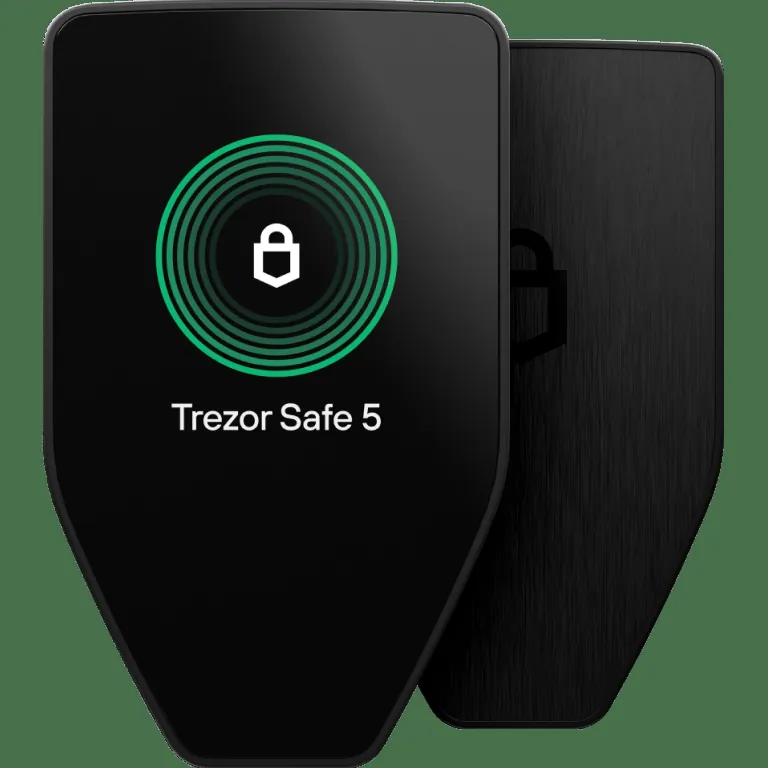
The meaningful differences are not primarily about whether one can protect Bitcoin and the other cannot. They concern how comfortably you interact with the device. The Safe 3 is the value model, using a small monochrome display and two physical buttons. The Safe 5 is the premium model, with a larger color touchscreen and haptic feedback.
That makes the choice relatively straightforward. If you mainly want to move Bitcoin into cold storage and leave it there, the Safe 3 provides the important security features without charging for a premium interface. If you frequently receive, send, organize, or verify transactions, the Safe 5 makes those tasks easier to read and approve.
- Choose Safe 3 for: lower cost, simple long-term storage, and physical-button controls.
- Choose Safe 5 for: a larger screen, touchscreen input, haptic feedback, and more comfortable recurring use.
- Security result: either model can be a sound choice when purchased from a trusted source, initialized correctly, and backed up responsibly.
If this is your first cold-storage device, read our explanation of how hardware wallets work. Understanding what the device protects is more important than choosing the most expensive model.
Price and Value
The Safe 3 is normally positioned around the entry-level end of Trezor's current lineup, while the Safe 5 costs roughly twice as much at standard list pricing. Promotions, bundles, regional taxes, shipping, and currency conversion can change the final amount, so confirm the current checkout price before deciding.
The price difference pays primarily for the Safe 5's interface. It does not buy twice the fundamental protection for your private keys. Both devices incorporate a secure element and run Trezor's transparent, auditable software stack. The Safe 5 adds a larger display, color, touch input, haptic feedback, and tougher display glass. Those features can reduce friction, but they do not replace careful seed-backup practices.
When the Safe 3 offers better value
The Safe 3 is the stronger value if the added cost of the Safe 5 would prevent you from buying a proper backup solution or moving a meaningful balance away from a custodial platform. A hardware wallet, a carefully protected recovery backup, and a sound process form one system. Spending the entire budget on the most polished device while storing its recovery words carelessly is a poor allocation.
It is also sensible for holders who expect very little device interaction. If you buy Bitcoin through a recurring plan, withdraw periodically, verify the receiving address, and rarely send, the Safe 3's smaller display may be only a minor inconvenience. Our guide to starting a consistent Bitcoin stack explains how that kind of routine can work.
When the Safe 5 justifies its premium
The Safe 5 becomes easier to justify when you will use it for years and interact with it often. A clearer display can make address inspection and transaction review less tedious. Touchscreen PIN and passphrase entry may also feel more natural to people who dislike navigating with two buttons.
Think of the premium as a payment for usability, not a requirement for secure ownership. If both prices fit comfortably within your budget, the Safe 5 is the more pleasant device. If price sensitivity matters, the Safe 3 preserves the core hardware-wallet function at a lower cost.
Choose the Lower-Cost Trezor Safe 3
The Safe 3 is the practical choice for secure long-term storage when you do not need a premium touchscreen.
View Trezor Safe 3 →Screen and Controls: The Biggest Difference
The display and input method create the clearest day-to-day difference between these wallets. The Safe 3 uses a small monochrome OLED screen with two physical buttons. The Safe 5 uses a larger color touchscreen protected by durable glass and provides haptic feedback when you interact with it.
Safe 3 physical buttons
Physical buttons are simple and predictable. You navigate prompts using the two controls and press them as directed to confirm an action. Some buyers actively prefer tactile controls because an intentional press feels distinct from touching a screen.
The tradeoff is limited screen space. Bitcoin addresses are long, transaction details may require more scrolling, and text entry is less convenient. This does not make the device unsafe, but it places more friction between you and a complete review of what you are signing.
Safe 5 touchscreen
The Safe 5's touchscreen displays more information at once and gives the interface room for larger controls. Haptic feedback confirms touches, which helps the screen feel less ambiguous. PIN entry, navigation, and transaction review are generally faster and easier to understand.
A larger display is especially useful when verifying a receiving address. Malware on a computer can attempt to replace an address copied to the clipboard, so the trusted address is the one shown on the hardware wallet. Our guide to verifying Bitcoin addresses safely covers this process in more detail.
The Safe 5 does not eliminate the need to read carefully. A larger screen only helps if you actually compare the device display with the intended destination. For occasional transactions, the Safe 3 remains adequate. For frequent use, the Safe 5's interface is the most persuasive reason to spend more.
Security Comparison
Both wallets are built around the same basic self-custody model. Your private keys are generated and used inside the device, and transactions must be authorized through physical interaction. Each model combines Trezor's open-source approach with an EAL6+ certified secure element intended to strengthen protection against physical attacks.
Neither device should be judged only by its secure element. Hardware-wallet security also depends on authentic firmware, clear transaction verification, a strong PIN, careful recovery-backup storage, and resistance to phishing. Most owners are more likely to lose funds through a compromised backup or deceptive transaction than through sophisticated laboratory extraction.
PIN and passphrase protection
A PIN helps protect the device if it is lost or stolen. An optional passphrase can create a separate wallet that cannot be recovered from the seed words alone. That can add protection, but it also adds another critical secret. A forgotten or mistyped passphrase can make the corresponding wallet permanently inaccessible.
Beginners should not enable advanced features merely because they sound safer. First learn how recovery works, complete a small test transaction, and make sure your backup procedure is reliable. If you later consider a passphrase, read our Bitcoin passphrase guide before moving a large balance.
Recovery backup risk
Your recovery backup can restore the wallet if the device fails, disappears, or is damaged. It can also give a thief control of the funds. Never photograph it, upload it to cloud storage, place it in a password manager, or type it into a website. Trezor Suite may guide legitimate recovery operations, but unsolicited requests for your backup are a warning sign.
The Safe 5's better interface can make some setup and verification steps easier, but it cannot protect recovery words exposed outside the device. For either model, disciplined backup handling remains the decisive security factor. Review our seed phrase security best practices before completing setup.
Setup and Daily Use
Both models connect through USB-C and are managed with Trezor Suite. During initialization, you should verify that the device arrives untampered with, install or confirm genuine firmware through the official software, create a new wallet, record the recovery backup offline, and set a PIN. Never use recovery words supplied on a printed card or by a seller.
The software experience is broadly similar because both devices use Trezor Suite for account management, receiving addresses, transaction construction, firmware updates, and portfolio visibility. The hardware interface becomes important when you confirm addresses, enter security information, or approve transactions.
Receiving Bitcoin
To receive Bitcoin, generate an address in Trezor Suite and verify it on the wallet's own display. Compare the complete address shown in Trezor Suite with the address displayed on the hardware wallet before sharing or using it. If the device splits the address across screens, scroll through every segment. Do not rely only on the first and last characters, especially after copying and pasting. The Safe 5's larger screen makes this comparison more comfortable, while the Safe 3 may require additional scrolling.
Sending Bitcoin
When sending, Trezor Suite builds the transaction and the device shows critical details for approval. You should review the destination and amount on the device, not merely on the computer. The Safe 5 presents this information more clearly, which matters if you send regularly. The Safe 3 works well for infrequent transfers, provided you remain patient.
Long-term storage
If the wallet will spend most of its life stored securely, interface differences matter less. Hardware can eventually fail, and no electronic device should be treated as the only route to your funds. Your offline recovery backup is the durable foundation. You can restore the wallet on compatible hardware when necessary.
Before moving your full balance, complete a small deposit and, if appropriate, a small send. Confirm that you understand fees, address verification, and recovery. The difference between cold storage and a hot wallet is ultimately about how keys are exposed, not simply which brand appears on the device.
Bitcoin-Only Options
Trezor offers Bitcoin-only editions for buyers who do not need support for other digital assets. A Bitcoin-only device uses firmware focused on Bitcoin, reducing unrelated functionality and presenting a cleaner experience for dedicated Bitcoin holders.
This preference is philosophical as well as practical. Bitcoin has a fixed supply cap of 21 million, uses proof of work to secure its transaction history, and reduces new issuance through halvings roughly every four years. Buyers who see those properties as the core reason to hold Bitcoin may prefer a wallet that is similarly focused.
Bitcoin-only firmware does not exempt you from normal security practices. You must still protect the recovery backup, verify addresses, install authentic updates, and avoid phishing. It also does not mean that the standard multi-asset edition is automatically unsafe. The choice depends on whether you value broader asset compatibility or a narrower interface.
For a dedicated Bitcoin stacker choosing between these two models, the Safe 3 remains the budget-conscious option, while the Safe 5 Bitcoin-only edition combines the premium touchscreen experience with a focused firmware configuration. If you might store other supported assets later, confirm the edition and firmware options before ordering.
Which Trezor Model Fits You?
Buy the Safe 3 if you are a cost-conscious beginner
The Safe 3 is a sensible first hardware wallet for someone who wants to leave an exchange, secure a growing Bitcoin balance, and learn self-custody without paying for premium controls. Its secure element, Trezor Suite support, and on-device confirmation provide the core features most beginners need.
It is especially appropriate if the savings will fund a durable backup or allow you to purchase directly from Trezor instead of an unknown reseller. The smaller display requires patience, but occasional users may never find it burdensome.
Buy the Safe 3 if you mainly receive and hold
A long-term holder who withdraws Bitcoin monthly and rarely sends has limited need for a premium touchscreen. Once the receiving address is verified and the transfer is complete, the device can remain stored while the wallet continues receiving funds.
Buy the Safe 5 if you expect regular transactions
The Safe 5 is the better fit for users who send, reorganize, or verify transactions frequently. Its larger color display and touch input reduce repetitive friction. Over several years, that improvement can be worth more than the initial savings from buying the Safe 3.
Buy the Safe 5 if accessibility and readability matter
People who struggle with small text or precise two-button navigation should favor the Safe 5 if the price is manageable. Security prompts are useful only when the owner can read and understand them. The larger interface may also make the learning process less intimidating for a first-time owner.
Consider another wallet if you need different priorities
Neither Trezor model is automatically best for every person. Advanced Bitcoin users may prioritize air-gapped workflows, removable batteries, microSD features, or deeper multisignature tools. Buyers comparing the broader market can consult our guide to the best hardware wallets.
Do not switch models simply because another device has a longer feature list. Choose a wallet whose backup process and transaction flow you can operate correctly. Usable security is more valuable than advanced capability you do not understand.
Choose the Trezor Safe 5 Bitcoin-Only Edition
The Safe 5 suits dedicated Bitcoin holders who want a larger color touchscreen, haptic feedback, and a Bitcoin-focused experience.
View Trezor Safe 5 Bitcoin-only →Final Verdict: Trezor Safe 3 vs Safe 5
For most price-conscious Bitcoin holders, the Trezor Safe 3 is the practical choice. It provides the essential hardware-wallet protections, works with Trezor Suite, includes a secure element, and supports verified on-device approval. Its compromises are visible and manageable: a small monochrome display, two-button navigation, and slower text interaction.
The Trezor Safe 5 is the better overall device. Its larger color touchscreen and haptic feedback make setup, address verification, PIN entry, and transaction approval more comfortable. That improvement matters most for frequent users, people who value readability, and buyers who expect to keep the same wallet for many years.
The Safe 5 is not required to secure a serious Bitcoin balance, and the Safe 3 is not merely a temporary starter device. Either can serve as long-term cold storage when used correctly. The correct purchase depends on how often you will interact with the wallet and whether the premium interface fits your budget.
- Best value: Trezor Safe 3.
- Best interface: Trezor Safe 5.
- Best for occasional receive-and-hold use: Trezor Safe 3.
- Best for frequent transactions and easier verification: Trezor Safe 5.
If the price difference is meaningful to you, buy the Safe 3 and put the savings toward a reliable recovery backup. If both are comfortably affordable, buy the Safe 5 for the screen and controls. For a deeper examination of the premium model, read our full Trezor Safe 5 review.
Whichever model you choose, purchase it from Trezor or another trusted authorized source, initialize it yourself, and treat the recovery backup as the most sensitive part of the system. The quality of your self-custody process will matter more than the logo or screen on the device.