If you own Bitcoin, you need to understand one thing above all else: not your keys, not your coins. Every day you leave Bitcoin on an exchange, you are trusting a third party with your wealth. Exchanges get hacked. Companies go bankrupt. Governments issue freezing orders. None of that can touch Bitcoin that you hold in self-custody with a hardware wallet.
A hardware wallet is a dedicated physical device that stores your private keys offline, completely isolated from the internet. When you sign a transaction, the signing happens inside the device, so your keys never touch an internet-connected computer. This guide covers the best hardware wallets available in 2026, what separates them, and which one deserves your money.
Why Self-Custody Is Non-Negotiable
The collapse of FTX in 2022 wiped out billions in customer funds overnight. Celsius, BlockFi, and Voyager followed. These were not fringe platforms. They were mainstream, heavily marketed, and seemingly reputable. Their customers lost everything they had left on the platform.
Self-custody means you hold the private keys that control your Bitcoin. No third party can freeze your funds, deny a withdrawal, go insolvent, or hand your assets over to regulators. A hardware wallet is the most secure and accessible way to achieve true self-custody. The upfront cost of a hardware wallet is trivial compared to what it protects.
What to Look for in a Hardware Wallet
Before diving into specific products, here are the criteria that matter:
- Security architecture: Does the device use a secure element chip? Is the firmware open source or auditable?
- Track record: Has the device been independently audited? Has the company responded well to disclosed vulnerabilities?
- Bitcoin support: Some wallets are Bitcoin-only. Others support hundreds of altcoins. This is a matter of preference, not safety.
- Ease of use: A secure wallet you find confusing to use is a wallet you will use incorrectly.
- Supply chain integrity: Buy direct from the manufacturer to avoid tampered devices.
- Recovery options: Standard BIP39 seed phrases give you maximum portability. Proprietary recovery systems can create long-term risk.
The Top Hardware Wallets in 2026
1. Ledger Flex (Top Pick)
The Ledger Flex is the best all-around hardware wallet available today. It features a large E Ink touchscreen, a certified secure element chip (CC EAL6+), and Ledger's mature, battle-tested firmware architecture. Setup is straightforward, the interface is clean, and the companion app Ledger Live is one of the most polished in the industry.
Ledger's secure element chip is the same class of hardware used in passports and credit cards. Your private keys are generated and stored inside this chip and never leave it. Ledger's firmware is partially open source, and the company has a long history of independent security audits and transparent responses to disclosed issues.
The Flex supports Bitcoin natively with full SegWit and Taproot compatibility. It also supports thousands of other assets if you choose to hold them. For users who want to consolidate their entire crypto portfolio onto a single device, the Flex handles it without compromise.
The 2023 Ledger Connect Kit incident, which affected a web interface layer rather than device security, was resolved quickly and led to meaningful architectural changes. The core device security was never compromised. No Bitcoin held in self-custody on a Ledger was lost.
Best for: Most users. Outstanding balance of security, usability, and ecosystem support.
Buy the Ledger Flex from the official store
Choose the best all-around hardware wallet
If you want the most balanced combination of touchscreen usability, secure element protection, and broad ecosystem support, the Ledger Flex is the article's top pick. Trezor remains the strongest alternative if open source transparency is your priority.
2. Ledger Nano X
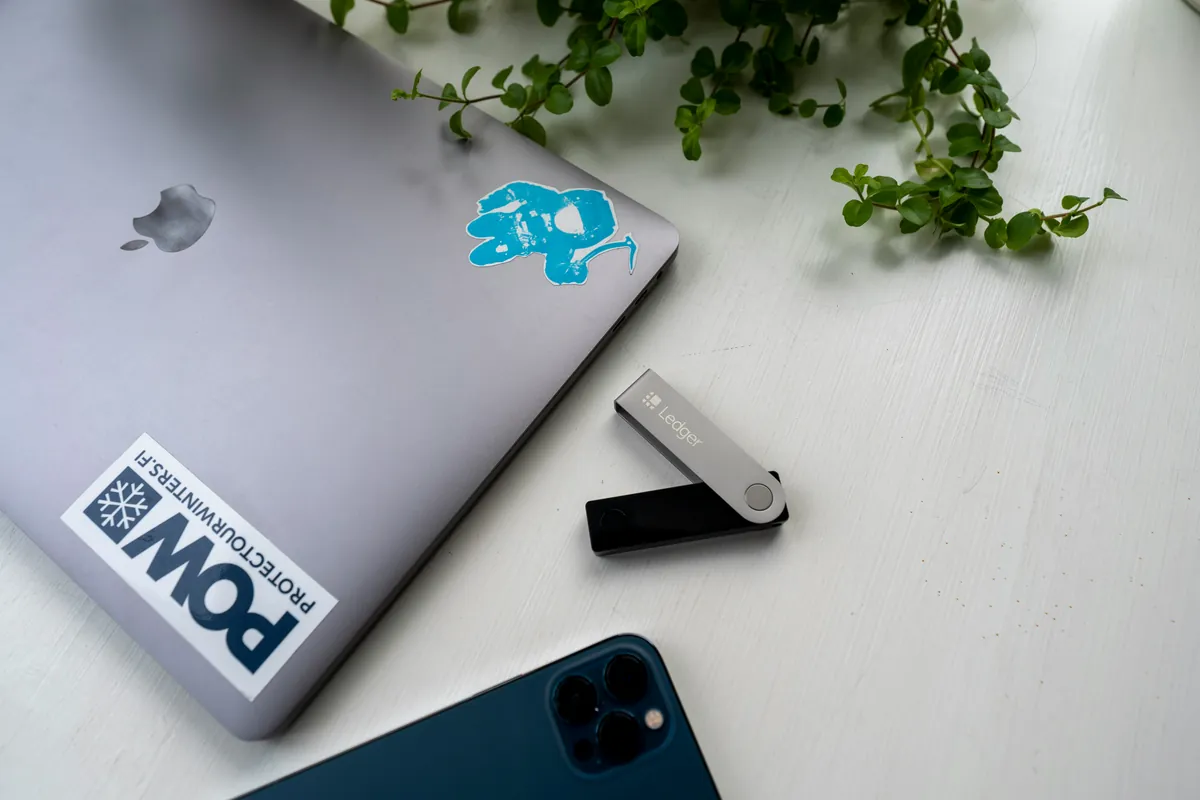
The Nano X is Ledger's mid-range device and remains one of the most widely used hardware wallets in the world. It has Bluetooth connectivity for mobile use, a small OLED screen, and the same CC EAL5+ secure element found in earlier Ledger hardware. It supports up to 100 apps simultaneously and pairs directly with the Ledger Live mobile app on iOS and Android.
For users who want a proven, compact device at a lower price point than the Flex, the Nano X is a reliable choice. It lacks the touchscreen of the Flex but covers the same security fundamentals. Millions of units have been deployed, and the device has held up well against years of real-world adversarial scrutiny.
Best for: Users who want a capable, mobile-friendly device at a lower price.
3. Coldcard Mk5
The Coldcard is the gold standard for Bitcoin-only security. It is designed by Coinkite, a company with deep roots in the Bitcoin developer community, and it targets advanced users who want maximum control and auditability. The Mk4 features dual secure element chips from two different manufacturers, an air-gapped signing mode via NFC or microSD card, and a passphrase system that allows advanced key management schemes.
The Coldcard's firmware is fully open source. Security researchers have audited it extensively. It supports Partially Signed Bitcoin Transactions (PSBT), which means you can construct and verify transactions without ever plugging the device into an internet-connected machine. For users running a full node or using advanced multisig setups, the Coldcard integrates cleanly with tools like Sparrow Wallet and Specter Desktop.
The tradeoff is complexity. The Coldcard has a steep learning curve. The interface is not intuitive for beginners. But for technically inclined users who treat their hardware wallet as a serious security tool, it is unmatched.
Best for: Advanced Bitcoin-only users, node runners, and those building multisig vaults. Read our full Coldcard Mk5 review for a deep dive into its security architecture and daily use.
4. Trezor Safe 5
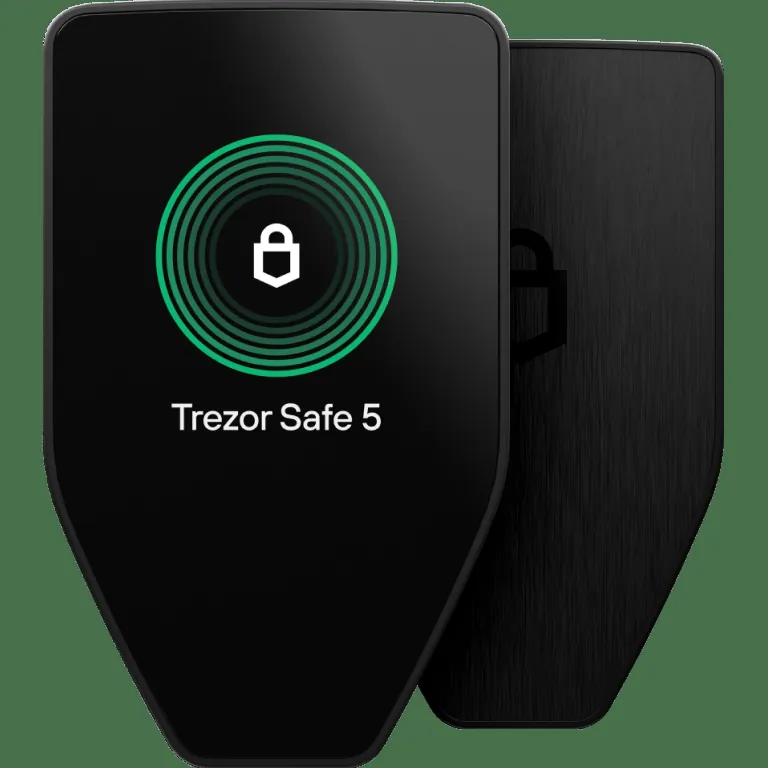
The Trezor Safe 5 is SatoshiLabs' current flagship hardware wallet, replacing the discontinued Model T. It features a vivid color touchscreen with haptic feedback, a dedicated Secure Element chip (EAL6+), and fully open source firmware that anyone can audit. It supports Bitcoin with full Taproot and SegWit compatibility, as well as a broad range of other assets.
Trezor's defining advantage is transparency. Every line of firmware is publicly available for review. The company has an outstanding track record of responsible vulnerability disclosure and has never had a confirmed remote exploit of device security. The Safe 5 adds a Secure Element to Trezor's already strong open source foundation, closing the hardware attack surface gap that existed in older models.
Trezor Suite, the companion desktop application, is clean and feature-rich. Shamir Backup is supported, allowing you to split your recovery seed across multiple shares for added resilience.
Best for: Users who prioritize fully open source firmware, hardware transparency, and an approachable touchscreen interface.
Buy the Trezor Safe 5 from the official store
Prefer an open source hardware wallet
The Trezor Safe 5 is the clearest fit if you want a modern touchscreen device with fully open source firmware and a strong security track record. Ledger is still worth comparing if mobile support or its software ecosystem matters more to you.
5. Foundation Passport (Batch 2)
The Passport is a Bitcoin-only hardware wallet built by Foundation Devices, a U.S.-based company focused entirely on self-sovereignty. It features a fully open source hardware and software design, an air-gapped QR code signing workflow, a rechargeable battery, and a premium build quality that feels more like a consumer electronics device than most hardware wallets on the market.
The Passport integrates cleanly with popular Bitcoin wallet software including BlueWallet, Sparrow, and Envoy, Foundation's own companion app. Its air-gapped QR code workflow is genuinely elegant: scan a QR code from your wallet software on the Passport's camera, review the transaction on the device screen, approve it, and scan the signed transaction back. No USB connection required.
Foundation publishes all hardware schematics and firmware source code publicly. For users who want a polished, beginner-accessible device without sacrificing open source principles, the Passport is a compelling alternative to Trezor.
Best for: Bitcoin-only users who want open source hardware with an air-gapped workflow and premium build quality.
Hardware Wallet Comparison at a Glance
- Ledger Flex: Best overall. Secure element, touchscreen, Ledger Live ecosystem. Good for beginners and advanced users alike.
- Ledger Nano X: Best mid-range. Bluetooth mobile support, proven track record, lower price than Flex.
- Coldcard Mk5: Best for advanced users. Bitcoin-only, dual secure element, full air-gap capable, steep learning curve.
- Trezor Safe 5: Best fully open source. Secure Element chip, vivid touchscreen, fully auditable firmware, Shamir Backup support.
- Foundation Passport: Best Bitcoin-only premium. Open source hardware and firmware, elegant QR-based air-gap workflow.
How to Set Up Your Hardware Wallet Safely
Buying the right hardware wallet is only step one. How you set it up matters just as much.
- Buy direct from the manufacturer. Never buy a hardware wallet from Amazon, eBay, or a third-party reseller. Tampered devices with pre-seeded keys have been used to steal funds.
- Verify packaging and device integrity before initializing. Most manufacturers include tamper-evident seals and instructions for confirming the device has not been modified.
- Generate your seed phrase on the device. Never enter a seed phrase provided by someone else, and never type your seed phrase into any software or website.
- Write your seed phrase on paper or steel. Do not store it digitally. Do not photograph it. Do not save it in a password manager. Your seed phrase is the master key to all your Bitcoin.
- Store your backup securely. Multiple physical copies in separate secure locations reduces the risk of total loss from fire, flood, or theft.
- Test recovery before sending large amounts. Restore from your seed phrase on a clean device to confirm your backup is correct before trusting it with significant funds.
The Bottom Line
If you are serious about holding Bitcoin, a hardware wallet is not optional. It is the foundation of responsible self-custody. The devices covered in this guide represent the best options available in 2026 across different use cases and price points.
For most people, the Ledger Flex is the right answer. It delivers serious security through its certified secure element chip, an intuitive touchscreen interface that makes daily use straightforward, and a mature software ecosystem in Ledger Live. The Nano X is the right choice if you want those same fundamentals at a lower price point.
If you are technically inclined and Bitcoin-only, the Coldcard Mk5 or Foundation Passport will serve you better. Both are built specifically for Bitcoin holders who want maximum auditability and air-gapped signing capability.
Whatever device you choose, get it set up, back up your seed phrase properly, and move your Bitcoin off exchanges. The point of hardware wallets is not just security in the abstract. It is sovereignty. Your Bitcoin, controlled entirely by you, answerable to no one.
Buy direct and secure your backup properly
The most important rule is to buy from the manufacturer, initialize the wallet yourself, and protect your seed phrase offline. Both Trezor and Ledger sell directly through their official stores.