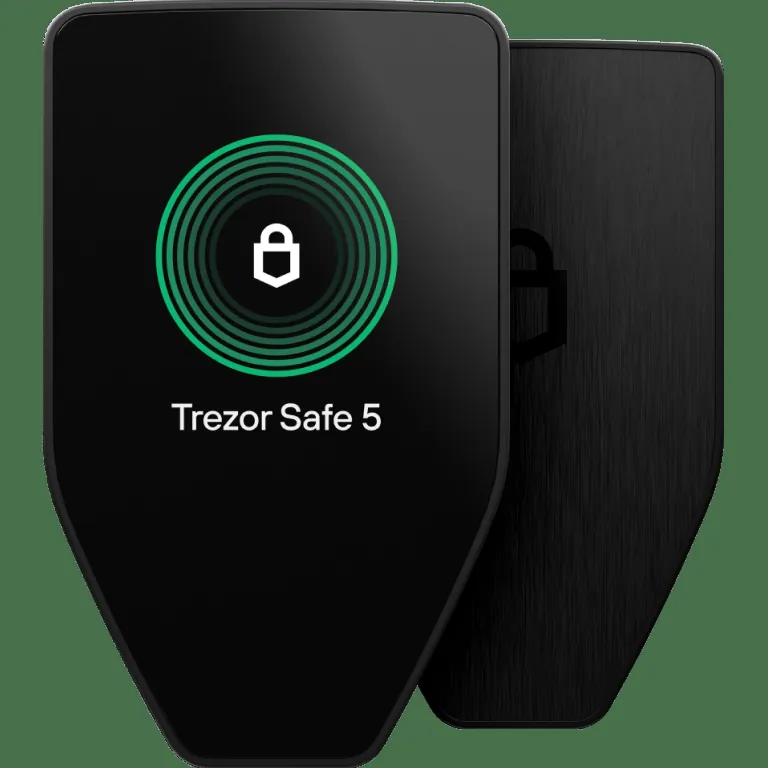
Best Bitcoin-Only Hardware Wallet: 2026 Shortlist
Our top five choices are the Trezor Safe 5 Bitcoin-only, Trezor Safe 3 Bitcoin-only, Coldcard MK5, BitBox02 Bitcoin-only edition, and Foundation Passport. They all keep private keys away from an internet-connected computer, but they differ significantly in interface, firmware scope, backup method, and transaction-signing workflow.
- Best overall: Trezor Safe 5 Bitcoin-only
- Best value: Trezor Safe 3 Bitcoin-only
- Best for advanced controls: Coldcard MK5
- Best compact option: BitBox02 Bitcoin-only edition
- Best QR-based workflow: Foundation Passport
This ranking is deliberately narrower than our broader hardware-wallet comparison. A multi-asset device can still secure Bitcoin effectively, but it is not the right product for a buyer who wants the smallest practical firmware scope and no altcoin features in the normal interface.
Do not choose on firmware labels alone. A wallet must also make receiving-address verification, backup creation, firmware updates, and transaction review understandable. A technically capable device can become a poor choice if its workflow encourages mistakes. If this is your first offline signer, read our explanation of how hardware wallets protect private keys before comparing individual models.
What Bitcoin-Only Really Means
Bitcoin-only can describe two different product designs. Some devices are built exclusively for Bitcoin, while others use the same physical hardware as a multi-asset model but run separate Bitcoin-only firmware. Trezor's Bitcoin-only Safe 3 and Safe 5 fall into the second category. Coldcard and Passport are designed around Bitcoin from the start.
The main benefit is reduced software complexity. Removing support for unrelated networks, token formats, and signing rules leaves fewer components to maintain and fewer prompts for the owner to interpret. This does not automatically make every Bitcoin-only wallet safer than every multi-asset wallet. Hardware architecture, firmware quality, supply-chain controls, recovery design, and user behavior still matter.
Bitcoin-only firmware also does not change Bitcoin's underlying rules. The network remains an open-source, proof-of-work system with a fixed supply cap of 21 million coins and scheduled halvings roughly every four years. The wallet simply stores the keys and signs valid transactions. For readers still separating the asset from the device that controls it, our guide to what Bitcoin is provides the necessary foundation.
Who should buy one
A Bitcoin-only wallet makes sense when you have decided not to custody altcoins, want a focused interface, and are comfortable keeping a dedicated backup. It is less suitable if you genuinely need one device for several networks or if specialized signing procedures would cause you to postpone withdrawing Bitcoin from an exchange.
The Five Best Options
1. Trezor Safe 5 Bitcoin-only: best overall
The Trezor Safe 5 Bitcoin-only offers the most balanced experience in this group. Its color touchscreen makes PIN entry, address inspection, and transaction confirmation easier than button-driven interfaces. It combines an EAL6+ certified secure element with Trezor's open-source approach, and it works through Trezor Suite for routine account management.
The dedicated Bitcoin-only edition arrives configured for Bitcoin use, keeping the everyday interface focused. It is particularly suitable for a first serious cold-storage setup because the device explains each action clearly. Its principal drawback is cost. Buyers who make only occasional transactions may not gain enough from the touchscreen to justify paying more than the Safe 3 price. See our full Trezor Safe 5 review for a deeper examination of the interface and recovery workflow.
2. Trezor Safe 3 Bitcoin-only: best value
The Safe 3 Bitcoin-only delivers the core benefits of Trezor's focused firmware and secure-element architecture at a lower price. It uses physical buttons and a smaller monochrome display rather than the Safe 5 touchscreen, but it still allows the owner to verify transaction details on the trusted device.
This is our value recommendation for someone buying a first Bitcoin-only wallet. The interface is less comfortable for frequent use, yet that matters little when the device is used a few times per year to move long-term savings. The smaller screen also means users should slow down when confirming addresses and fees.
3. Coldcard MK5: best for advanced controls
Coldcard is designed specifically for Bitcoin and is aimed at users who want detailed control over signing. It supports workflows that can keep transaction data off a directly connected computer, along with advanced policy and multisignature features. That flexibility makes it a strong option for experienced holders and collaborative custody setups.
It is not our default recommendation for a beginner. Its menus, terminology, and range of security choices create a steeper learning curve, while its greatest advantages are most valuable to owners who already understand partially signed Bitcoin transactions, wallet policies, and backup recovery. Beginners who would not use those controls are likely to be better served by a simpler device.
Current security consideration: Coldcard's July 2026 entropy advisory is material to this ranking. Coinkite says affected seed-generation firmware includes Mk2 and Mk3 versions 4.0.1 through 4.1.9; Mk4 and Mk5 versions before standard 5.6.0 or Edge 6.6.0X; and Q versions before standard 1.5.0Q or Edge 6.6.0QX. Fixed firmware corrects new seed generation, but updating does not repair a seed created on affected firmware. Existing owners with an affected seed should follow Coinkite's official migration instructions: update first, generate and back up a completely new seed, verify it carefully, and move funds to addresses controlled by that new seed. Coinkite identifies an exception for seeds created with at least 50 fair, independent, private dice rolls, but otherwise recommends migration.
Block's independent technical analysis traced the reduced-entropy paths and examined the practical search space across Coldcard generations. For a new buyer, Coldcard remains a defensible advanced option only after installing fixed firmware before generating the seed. For an existing owner, the decisive question is which firmware generated the current seed, not merely which version the device runs today. This confirmed incident is why Coldcard is a specialist pick here rather than our default recommendation.
4. BitBox02 Bitcoin-only edition: best compact option
The BitBox02 Bitcoin-only edition is a small USB-C device with focused firmware, touch controls, a dual-chip security design, and microSD-based backup support. Its desktop application presents a clean Bitcoin experience without turning every transfer into an advanced technical exercise.
Its compact body is convenient but gives it less screen space than the Safe 5 or Passport. Buyers should confirm that their computer or phone setup supports the intended connection before ordering. It is a good fit for someone who wants Bitcoin-only software and a polished workflow but does not need Coldcard's extensive controls.
5. Foundation Passport: best QR-based workflow
Passport centers its transaction flow on QR codes and removable media, allowing users to move unsigned and signed transaction data without a permanent USB data connection. Its larger screen and camera make QR review more comfortable than on smaller devices. It pairs naturally with wallets that support partially signed Bitcoin transactions.
The tradeoff is additional process. QR-based signing has real appeal, but it does not eliminate the need to verify addresses, protect backups, and secure the companion phone or computer. Passport is best for an owner who understands the workflow and values connection isolation enough to accept more steps.
Affiliate transparency: Our purchase buttons in this article point to Trezor because Hard Money Stack has an affiliate relationship with Trezor. BitBox02 and Passport are included because they earn their places on usability and workflow, not because they are monetized recommendations. Their lack of affiliate buttons does not count against them in the ranking.
Trezor Safe 5 vs Safe 3 Bitcoin-Only
The Safe 5 and Safe 3 Bitcoin-only editions protect the same asset and follow the same broad Trezor philosophy. The buying decision is therefore mostly about interface and budget, not access to a fundamentally different kind of Bitcoin.
- Choose the Safe 5 if you want a touchscreen, more comfortable transaction review, and an interface that is easier to navigate during setup and recovery.
- Choose the Safe 3 if you want the lower-cost route to Bitcoin-only Trezor firmware and are comfortable using two physical buttons.
For most beginners securing a meaningful balance, we prefer the Safe 5 because a clearer interface can reduce hesitation and input mistakes. For disciplined users who transact infrequently, the Safe 3 is the stronger value. Both require the same essential habits: buy from an authorized source, initialize the device yourself, install current official firmware, verify receive addresses on the hardware screen, and keep the recovery backup offline.
Neither model should arrive with a seed phrase already printed or supplied. If packaging or setup instructions ask you to use a preselected recovery phrase, stop and contact the manufacturer through its official website. A legitimate device generates the wallet during initialization under your control.
Choose the Trezor Safe 5 Bitcoin-only
Best for buyers who want focused Bitcoin firmware with a touchscreen that simplifies setup, address review, and transaction confirmation.
View Safe 5 Bitcoin-only →Comparing the Security Models
Hardware-wallet security is a system, not a single specification. A secure element can help resist physical extraction, while open-source firmware makes public inspection possible. Air-gapped communication can reduce exposure to a connected host, but QR codes and microSD files still carry transaction data that must be parsed correctly. None of these features compensates for an exposed recovery phrase.
Connected versus air-gapped signing
Trezor and BitBox02 prioritize straightforward connected use. Coldcard and Passport place more emphasis on moving transaction data through QR codes, microSD cards, or other separated methods. A cable is not automatically unsafe, because the private key should remain on the hardware device. The key question is whether you verify the destination address, amount, and fee on the device's own trusted screen before approving the signature.
Backup and recovery
Your recovery words can recreate the wallet without the original device, so they are usually the most sensitive part of the setup. Never photograph them, type them into cloud storage, or enter them on a website. Read our seed-phrase security practices before funding a new wallet.
Optional passphrases can separate funds from the written backup, but a forgotten passphrase permanently changes the wallet you can access. They should be added only after you understand the operational burden and have tested recovery with a small balance.
How to Choose the Right Wallet
Start with your actual threat model rather than the longest feature list. Most individual holders need protection from exchange failure, phishing, computer malware, physical loss, and poor backup handling. They do not necessarily need an elaborate multisignature system on day one.
- For a first wallet: Choose the Trezor Safe 5 Bitcoin-only if the price is comfortable, or the Safe 3 Bitcoin-only if it is not.
- For advanced policy controls: Choose Coldcard if you understand its more technical signing workflow and will use the additional controls.
- For compact connected use: Choose BitBox02 Bitcoin-only.
- For QR-based signing: Choose Passport and verify compatibility with your preferred coordinator software.
Also consider how often you transact. A touchscreen has more value when you regularly review withdrawals, while a less expensive button-driven device can be entirely adequate for long-term storage. Compatibility matters as well. Confirm support for your operating system, preferred Bitcoin wallet software, multisignature plan, and connection method before buying.
Whichever device you select, begin with a small transfer. Verify the receive address on the hardware screen, send a test amount, confirm it, and practice locating the same account after reconnecting the wallet. Our guide to verifying Bitcoin addresses safely explains why checking only a shortened address is insufficient.
Purchase directly from the manufacturer or an explicitly authorized seller. Record neither the seed nor passphrase in a password manager. Store the backup separately from the device, and make sure a trusted person could follow documented recovery instructions if your estate plan requires it.
Choose the Trezor Safe 3 Bitcoin-only
Best for cost-conscious stackers who want Trezor's Bitcoin-only experience and are comfortable with a button-driven interface.
View Safe 3 Bitcoin-only →Final Verdict
The Trezor Safe 5 Bitcoin-only is the best Bitcoin-only hardware wallet for most buyers in 2026. It combines focused firmware, an open-source design, a secure element, and a touchscreen that makes critical confirmation steps easier to understand. The Safe 3 Bitcoin-only is the better value when price matters more than interface comfort.
BitBox02 Bitcoin-only is a strong compact alternative, while Passport suits users who specifically want QR-based signing. Coldcard MK5 remains the specialist choice for experienced users who value granular controls and are comfortable with a more technical workflow.
The device is only one layer. Long-term security still depends on generating the wallet yourself, installing official firmware, checking addresses on the trusted screen, protecting the recovery backup, and testing the process before transferring a large balance.